

How to submit to Postmake
Postmake is a hand-curated directory of 3,000+ tools and resources for founders and makers, sorted into categories like productivity, design, development, marketing, launch, growth and AI. Each listing has its own page with an overview, features and pricing. Every plan, including the free one, comes with 10+ dofollow links.
Checked by the LeadWave team on Nov 20, 2026: we opened Postmake's submit page, read its price. How we check · Something changed? Tell us
Postmake at a glance
- Type
- Startup directory
- Price
- Free with a backlinkPaid from $49 one-time
- Popularity
- Niche
- Authority (our estimate)
- 56 / 100
- Monthly visits (our estimate)
- Under ~25,000
- Badge or backlink required
- Yes
- Approval
- manual review; full refund if not a fit
- Submit at
- postmake.io/submit
- Contact
- hello@postmake.io
Not published or not checked yet: link type, whether you need an account.
Of the 273 SaaS directories we track, Postmake ranks #190 by authority.
10+ dofollow links (55 DR) on every plan; free badge listing lasts while the badge stays visible.
How to submit to Postmake, step by step
- 1
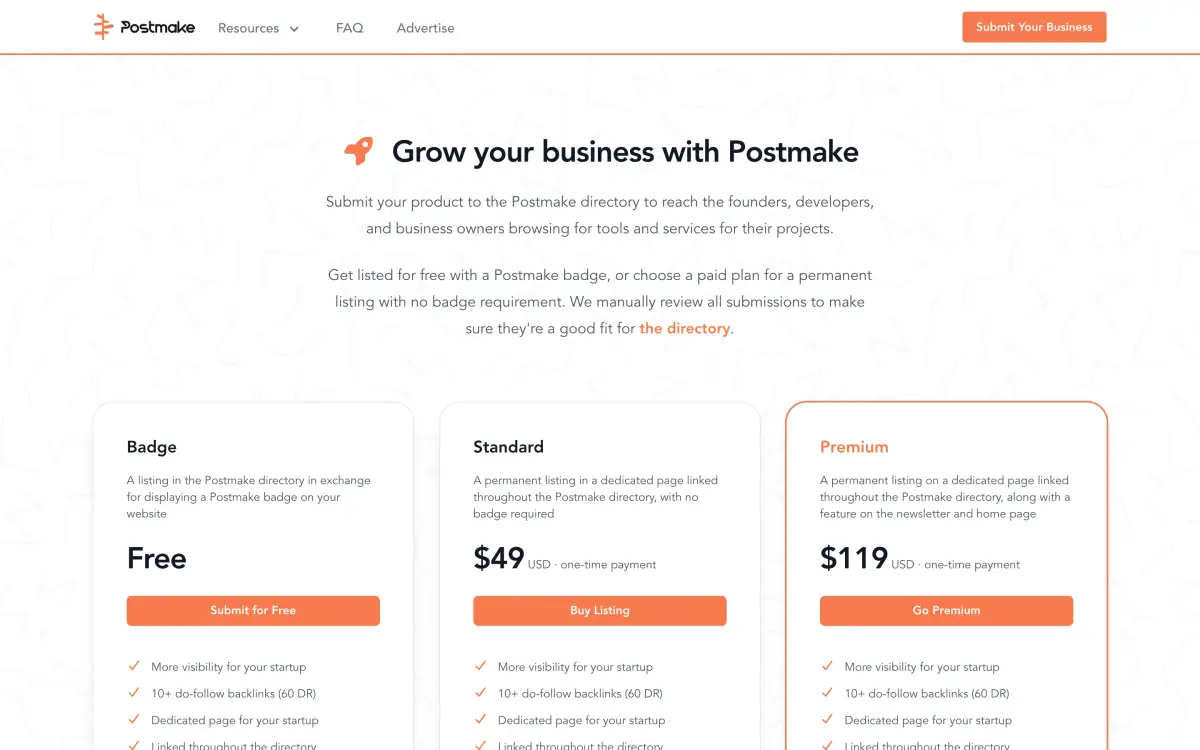
Open postmake.io/submit and pick a plan: the free Badge listing, Standard ($49 one-time) or Premium ($119 one-time).
- 2
For the free plan, add the Postmake badge to your website, then send your product through the badge submission form.
- 3
For a paid plan, enter your product name, website and email at checkout and pay.
- 4
Wait for the manual review. Postmake lets you know when the listing is published.
- 5
On Premium, agree the newsletter issue and home page slot with Postmake after approval.
What Postmake asks for
- Business tools and services fit best; Postmake reviews every submission by hand for fit.
- The free listing lasts only while the badge stays visible on your site, and it isn't featured anywhere.
- Standard is a permanent page with no badge and 30 days in What's New. Premium adds one newsletter issue (1,900+ subscribers) and a home page spot.
- Paid listings don't expire. If your product isn't a fit, you get a full refund.
- Listings can be removed if the product shuts down, becomes irrelevant or breaks the directory's rules.
Is Postmake worth it?
A solid pick for any SaaS or maker tool: it's curated, relevant to founders and the links are dofollow. The free badge route works if you're fine keeping a badge on your site; $49 buys a permanent page without it. Premium only makes sense if a 1,900-subscriber newsletter reaches your buyers.
Postmake alternatives
6 similar startup directories, most popular first, next to Postmake. Each name opens its own page.
| Directory | Price | Popularity |
|---|---|---|
| PostmakeThis page | Free with a backlinkPaid from $49 one-time | Niche |
 Wellfound | Free + paid | High |
 Crunchbase | Free | High |
 BetaList | Paid | Medium |
 Alternative.me | Free | Medium |
 F6S | — | Medium |
 Dealroom | — | Medium |
Authority is our 0–100 estimate from Common Crawl's web graph; it reads like Moz DA or Ahrefs DR.
Postmake FAQ
Only on the free plan: the listing stays published while the badge is visible. Standard and Premium need no badge.
Postmake reviews every submission by hand and gives a full refund if the product isn't a good fit.
Postmake is free if you add their badge or link. Free with their badge (not permanent); Standard $49 permanent, no badge, 30 days in What's New; Premium $119 adds newsletter (1,900+ subscribers) and home page. Checked on Nov 18, 2026; prices change, so confirm on the submit page.
Email hello@postmake.io, the address Postmake gives for listings and questions. For a change to a listing, include the listing's URL.
Manual review; full refund if not a fit, as of Nov 18, 2026.
Postmake is outside the million most visited websites in Chrome's ranking, so expect a modest number of visitors from it. Smaller directories can still be worth it for a link or a focused audience.
Wellfound (free + paid, high popularity), Crunchbase (free, high popularity), BetaList (paid, medium popularity) and Alternative.me (free, medium popularity). This page compares them with Postmake on price, link and authority.