
Yes, Granola is free to use. Its Basic plan costs $0 per user per month, with no limit on meetings and no time limit. The catch is history: on the free plan you can only open notes from the last 30 days. Unlimited history, a choice of AI models and most integrations come with Business, at $14 per user per month (Granola).
Granola.ai and Granola AI are the same product: the AI notepad from Granola, Inc., at granola.ai. Prices below are from Granola’s pricing page and help center as of November 2026.
Granola pricing in 2026: Basic, Business and Enterprise
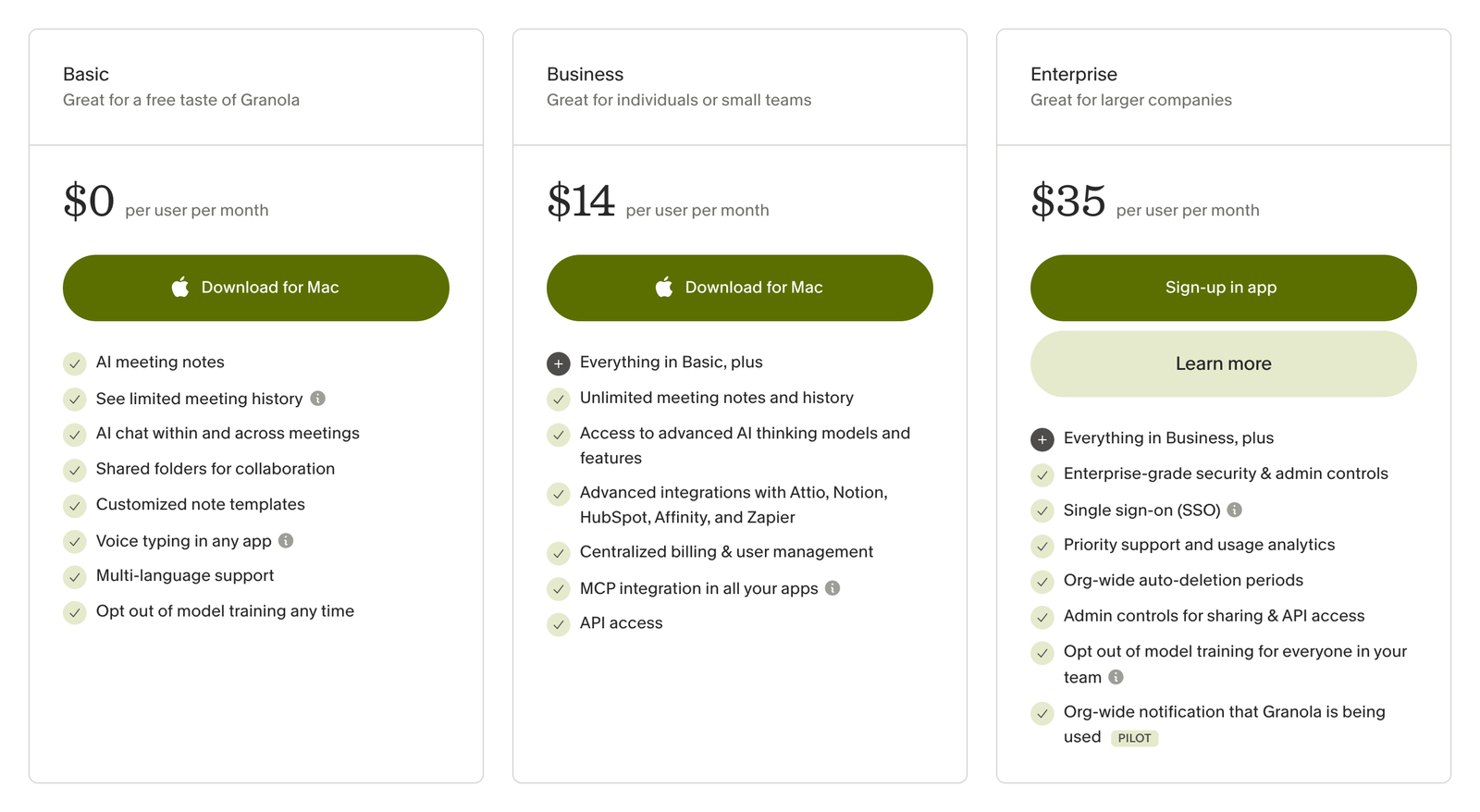
Granola’s plans as its pricing page showed them on November 14, 2026.
Plan | Price | Best for | Main limits |
|---|---|---|---|
Basic | Free ($0) | Trying Granola, or anyone who only needs recent notes | Last 30 days of notes in the app; Auto model only in chat; Slack is the only integration |
Business | $14 per user per month, billed monthly | Individuals and small teams | None on history; adds model choice, Notion, HubSpot, Attio, Affinity, Zapier and API access |
Enterprise | From $35 per user per month, monthly or annual | Larger companies | Adds SSO (50+ users), admin controls, HIPAA workspaces and an audit API |
Billing is per workspace, not per person: everyone in a workspace shares the same plan and every active member is a paid seat. Annual billing exists only on Enterprise contracts; Basic and Business are billed monthly, and no plan has a daily transcription limit (Granola help center). For a 10-person team, Business works out to $140 a month, or $1,680 a year.
What you get on Granola’s free plan
AI meeting notes from your computer’s or phone’s audio, with no bot joining the call
AI chat about a single meeting or across meetings
Shared folders, custom note templates and Recipes (saved prompts you run after a meeting)
Voice typing in any app, with no word limit
The iPhone, Android and Apple Watch apps: you don’t need a paid plan to take notes on mobile
Multi-language support, the Slack integration and a model-training opt-out
The comparison table on the pricing page marks all of these as included on Basic. Granola’s own blog calls the free plan “genuinely complete” for daily note capture and sharing folders with a team (Granola).
The 30-day limit: what happens to older notes
Nothing is deleted. On Basic, notes older than 30 days are stored, but they aren’t accessible in the app until you upgrade. You can still get them out: Settings > Profile > Generate CSV emails you the titles and summaries of your full note history within a few hours (Granola help center). Full transcripts aren’t in that export.
The same 30-day window applies to the People & Companies view and to MCP, the connection that lets Claude, ChatGPT and other AI tools read your notes. On the free plan MCP can query your notes but not fetch raw transcripts (Granola).
What Granola’s free plan doesn’t include
Notes and history older than 30 days
Choosing the AI model in chat: Basic runs on Auto, and the other models appear greyed out (Granola help center)
Pre-meeting briefs, follow-up emails and a workspace-wide dictionary
Integrations other than Slack: Notion, HubSpot, Attio, Affinity and Zapier need Business; Salesforce needs Enterprise
API access and centralized billing
Is Granola’s voice typing free?
Yes, for everyone, including the free plan. Granola launched voice typing on October 29, 2026 with the line “Unlimited words, for free” (Granola on LinkedIn): you hold a key, speak, and the text appears in whichever app you’re typing in. TechCrunch reported it as available on all plans “without any limits”, a direct shot at Wispr Flow (TechCrunch).
It started on Mac. Granola’s voice typing page now lists Mac, Windows and iOS, with Android coming soon, and still says “Free for all Granola users.”
Is Granola free for students?
Yes, for a year. The Student Pack gives currently enrolled students at accredited universities in the US, UK and Canada 12 months of Granola Business for free. You upload a student ID to apply, and you can refer up to five friends at your university for the same offer (Granola). Granola calls it a limited-edition offer, and the pack is tied to your academic email, so it can’t move to a personal address later.
Is Granola free for startups and nonprofits?
Startups with fewer than 30 employees that have raised a pre-seed or seed round get one year of Business free. The round has to come from one of Granola’s 500+ approved investors, bootstrapped companies don’t qualify, and you must never have paid for Granola or used a promo code (Granola), so apply before buying any seats.
Registered nonprofits don’t get it free, but they can get 50% off Business for as long as they stay eligible, after verifying through Goodstack (Granola).
Does Granola have a free trial?
The free Basic plan is the main way to try Granola, and it never expires. Some new workspaces also start on a time-limited trial of Business; Granola doesn’t publish its length. When a trial ends without a subscription, the workspace moves to Basic automatically and you aren’t charged (Granola help center).
How Granola’s free plan has changed
When | Free plan | Paid plans |
|---|---|---|
Until September 2025 | 25 free meetings, then you had to pay | Individual $18 a month; Business $14 per user per month |
October 2025 | Basic: unlimited meetings, 14 days of history | Individual dropped; Business $14; Enterprise from $35 |
By March 2026 | Basic: history extended to 30 days | Business $14; Enterprise $35 |
Autumn 2026 | Slack integration and unlimited voice typing (October 29) added to Basic | Unchanged |
Archived copies of the pricing page show the switch: “25 free meetings” and an $18 Individual plan in September 2025 (Wayback Machine), then a $0 Basic plan with “14 days of meeting history” by October 8, 2025 (Wayback Machine). Some review sites still quote the old 25-meeting cap or the Individual plan; neither exists any more.
Should you stay on the free plan?
Stay on Basic if you mostly need notes from this week’s meetings and share them through folders or Slack. Upgrade to Business when you need to look up something said more than a month ago, ask questions across months of calls, or push notes into a CRM or Notion automatically. Teams that need SSO, HIPAA or org-wide controls need Enterprise.
How to cancel Granola
Go to Settings > Billing, click Manage subscription and cancel in Stripe’s billing portal. You keep Business until the end of the current billing month; after that the workspace drops to Basic, and your older notes stay stored but hidden (Granola help center).
More on Granola
Granola company profile: revenue, valuation, funding and owners
Granola CEO Chris Pedregal: bio, career timeline and contact routes
European alternatives to Granola: meeting note-takers that keep data in Europe
AI note-taker companies: Granola next to Otter, Fireflies, Fathom and others
Granola’s pricing page, full screenshot: how the page is designed
Need verified CEO emails for outbound? The LeadWave SaaS companies list has hand-checked CEO contact details for 15,000+ SaaS companies in one CSV.